Mois : août 2025

DOM-based Extension Clickjacking : Le ciblage invisible des gestionnaires de mots de passe


Contexte technique

Lors de la conférence DEF CON 33, le chercheur en sécurité Marek Tóth a dévoilé une vulnérabilité redoutable affectant les extensions de gestionnaires de mots de passe : le DOM-based Extension Clickjacking, permettant d’exfiltrer des données sensibles par un simple clic utilisateur marektoth.comThe Hacker News.


Qu’est-ce que le DOM-based Extension Clickjacking ?

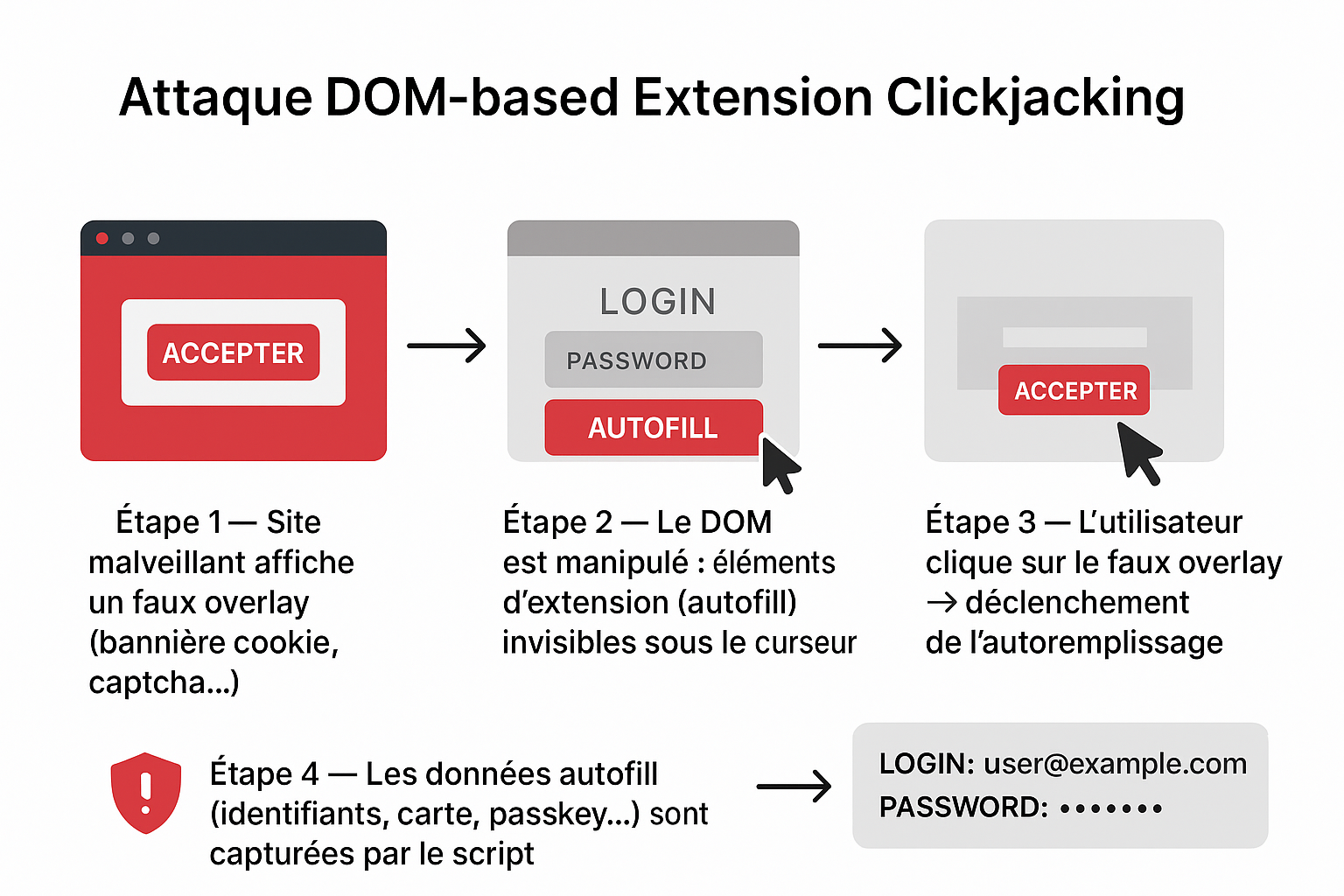
Contrairement aux attaques de clickjacking classiques côté Web (iframes invisibles), cette attaque cible les éléments injectés dans le DOM par une extension (menus d’autoremplissage, pop-ups…). Le script malveillant :

  • rend ces éléments invisibles via opacity: 0,
  • capte un clic sur une fausse interface (ex : bannière cookie),
  • et déclenche l’autoremplissage pour exfiltrer les données marektoth.comheise onlineThe Hacker News.

Résultats des tests – 11 gestionnaires analysés

Statut de la vulnérabilitéGestionnaires concernés
CorrigésNordPass, ProtonPass, RoboForm, Dashlane, Keeper marektoth.comReddit
Toujours vulnérables (au 19–21 août 2025)Bitwarden, 1Password, iCloud Passwords, Enpass, LastPass, LogMeOnce marektoth.comThe Hacker NewsSocket

Impact estimé : ~40 millions d’utilisateurs actifs marektoth.comThe Cyber Express.

Données exfiltrables

  • Numéros de carte bancaire (numéro, CVV…) → 6/9 cas marektoth.com
  • Données personnelles (nom, email, adresse…) → 8/10 cas marektoth.com
  • Identifiants, mots de passe, TOTP → 10/11 cas marektoth.com
  • Passkeys (authentifications cryptographiques modernes) → exploitables via “signed assertion hijacking” → 8/11 cas marektoth.com

Pourquoi c’est critique

  1. L’attaque est universelle : aucun bug spécifique requis, un simple clic suffit The Cyber Express.
  2. Les protections classiques côté Web ne suffisent pas.
  3. Même des extensions configurées en mode manuel (pas d’autoremplissage automatique) restent vulnérables marektoth.com.
  4. Les passkeys, initialement considérées comme plus sécurisées, peuvent aussi être compromises si les défis côté serveur ne sont pas correctement mis en œuvre marektoth.comThe Cyber Express.

Contre-mesures à court terme

  • Active les mises à jour automatiques de ton navigateur et de ton extension heise onlineThe Hacker News.
  • Désactive l’autoremplissage ; privilégie le copier-coller.
  • Pour les navigateurs Chromium, configure l’extension en mode « On click » (accès sur clic uniquement) marektoth.comheise online.
  • Côté serveur : assure-toi que chaque connexion via passkey inclut un challenge session-bound dynamique, pour éviter le réemploi abusif marektoth.com.

Autofill feature

Password managers have autofill functionality that can be of 2 types:

  • Automatic autofill – credentials are automatically filled in (0-click)
  • Manual autofill – user interaction is required to fill in credentials (selecting from a dropdown menu)

My research focuses on clickjacking, so click is required and I was focus only on manual autofill.

On automatic autofill I published research in 2021 (blog).

Browser Extension Clickjacking

Clickjacking vulnerability in browser extensions works similarly to web applications. Through clicking, the user unknowingly performs an action that causes their browser extension to execute malicious activity such as data exfiltration, functionality deactivation, stored note deletion and others.

Browser extension clickjacking can currently be categorized into 2 types:

  • IFRAME-based – publicly described type (web_accessible_resources)
  • DOM-based – new described type

I will first describe the IFRAME-based variant, which was not the research focus but may be unknown to many people.

IFRAME-based

A publicly documented clickjacking technique for browser extensions exploits misconfigured web_accessible_resources in the manifest.json file.

manifest.json is the main configuration file of a browser extension. It contains basic information such as the extension’s name, version, and description, as well as settings that define what scripts, icons, and permissions the extension uses. Without this file, the browser cannot recognize or run the extension.

Chromium-based path:
chrome-extension://<extension_ID>/manifest.json

Mozilla Firefox path:
moz-extension://<extension_ID>/manifest.json

Local device path:
%LocalAppData%\Google\Chrome\User Data\Default\Extensions\<extension_ID>\<version>\manifest.json

In the web_accessible_resources part, developers explicitly define files (HTML, scripts, styles, images) that should be accessible from web pages outside the extension interface itself. If developers don’t specify sufficient restrictions, attackers can abuse these resources.

Usage

When files with significant functionality (HTML files) are defined in web_accessible_resources, an attacker can create a page that loads this file into a transparent iframe and tricks users into unknowingly clicking on extension elements.

This uses basically the same principle as web application clickjacking.

Basic usage:

<iframe src="chrome-extension://<extension_ID>/file.html" style="opacity:0"></iframe>

Example

Although this isn’t a new technique and information has been available for several years, some extensions still have this security vulnerability. In this research focused on password managers, one of them had this issue.

In December 2023, I reported this clickjacking vulnerability in the NordPass password manager. Due to incorrect web_accessible_resources definition, it was possible to load the entire password manager UI in an iframe.

With 4 clicks, it was possible to share all items from the password manager to an attacker’s account. The result was that the attacker gained access to all stored passwords, credit cards, and personal data without the user’s knowledge.

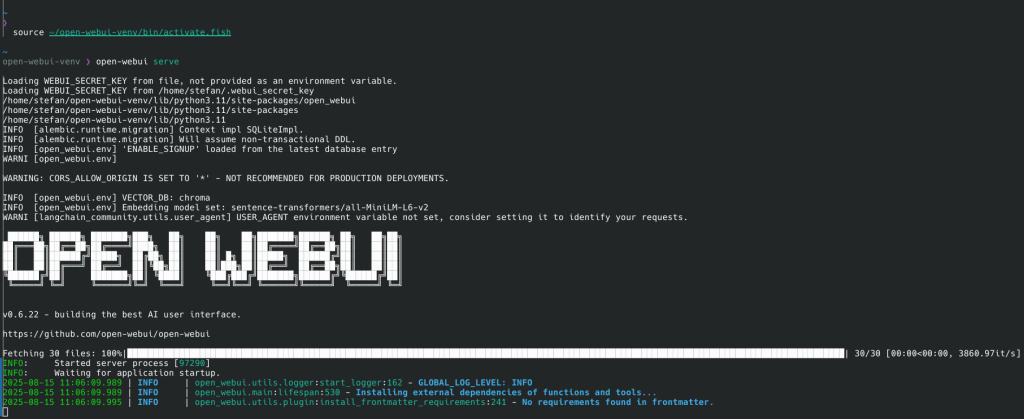
Install Openweb-UI sous cachyOS

Key Features of Open Web UI:

  • Intuitive Chat Interface: Inspired by ChatGPT for ease of use.
  • Responsive Design: Works smoothly on both desktop and mobile devices.
  • Swift Performance: Fast and responsive user experience.
  • Easy Setup: Can be installed using Docker or Kubernetes tools like kubectl, kustomize, or helm.
  • Theme Customization: Offers a variety of themes for personalization.
  • Code Syntax Highlighting: Enhances code readability.
  • Markdown and LaTeX Support: Full support for rich text and mathematical expressions.
  • RAG Integration: Advanced document interaction with Retrieval Augmented Generation, including local and remote document access.
  • Web Browsing: Integrate web content directly into chats.
  • Prompt Presets: Easy access to preset conversation starters.
  • RLHF Annotation: Feedback tools for training models using thumbs up/down and textual feedback.
  • Conversation Tagging: Simplifies searching and organizing chat records.
  • Model Management: Download, delete, or update Ollama models directly from the UI.
  • Multiple Model Support: Switch between different models for varied interactions.
  • Multimodal Interactions: Supports image generation and other multimodal functionalities.
  • Modelfile Builder: Create and customize modelfiles easily.
  • Collaborative Chat: Group conversations with multiple models.
  • Local Chat Sharing: Generate and share chat links for collaboration.
  • Voice Input and Text-to-Speech: Interact with models using voice; customize TTS settings.
  • Advanced Parameters Control: Customize conversation settings with detailed parameters.
  • OpenAI API Integration: Supports integration with OpenAI and other compatible APIs.
  • Multi-User Management: Administer user roles and access through a comprehensive admin panel.
  • Security Enhancements: Features like model whitelisting, role-based access, and backend reverse proxy support.
  • Multilingual Support: Available in multiple languages with ongoing expansion efforts.
  • Continuous Updates: Regular enhancements and new features.
# installer python 3.11 si pas déjà fait
sudo pacman -Syu python311

# créer un venv avec python 3.11
python3.11 -m venv ~/open-webui-venv

# activer le venv pour fish
source ~/open-webui-venv/bin/activate.fish

# vérifier que pip et python sont du venv
which python
which pip

# installer open-webui dans le venv
pip install open-webui

#Démarer open web-ui , part défaut port 8080 
open-webui serve 

#si besoin de spécifier autre port 
open-webui serve --port 3000


iamuz.py

Script python pour télécharger le contenu d’une archive en fonction de l’id sur Internet Archive,


❯ python3 iamuz2.py --help
usage: iamuz2.py [-h] [--id ID] [--debug] [--selftest]

Télécharge des MP3/OGG depuis archive.org

options:
  -h, --help  show this help message and exit
  --id ID     Identifiant Archive.org
  --debug     Mode debug
  --selftest  Test du script

~
  • Création automatique des dossiers avec dest.parent.mkdir(parents=True, exist_ok=True).
  • Détection des fichiers audio basée sur l’extension .mp3 ou .ogg.
  • Logs détaillés pour toutes les étapes : récupération, téléchargement, erreurs.
  • --selftest pour vérifier que le script peut créer des dossiers correctement.

#!/usr/bin/env python3
import os
import sys
import requests
import argparse
from pathlib import Path
from time import time

DOWNLOAD_DIR = Path("downloads")

def log_debug(msg):
    print(f"[DEBUG] {msg}")

def log_info(msg):
    print(f"[INFO] {msg}")

def log_warn(msg):
    print(f"[WARN] {msg}")

def fetch_metadata(identifier, session):
    url = f"https://archive.org/metadata/{identifier}"
    log_debug(f"Récupération des métadonnées pour {identifier} depuis {url}")
    try:
        response = session.get(url)
        response.raise_for_status()
        return response.json()
    except requests.RequestException as e:
        log_warn(f"Impossible de récupérer les métadonnées: {e}")
        return None

def find_audio_files(metadata):
    files = metadata.get("files", [])
    audio_files = [f["name"] for f in files if f["name"].lower().endswith((".mp3", ".ogg"))]
    log_info(f"{len(audio_files)} fichier(s) audio trouvé(s)")
    for f in audio_files:
        log_debug(f" → {f}")
    return audio_files

def download_file(session, identifier, file_name):
    url = f"https://archive.org/download/{identifier}/{file_name}"
    dest = DOWNLOAD_DIR / file_name
    dest.parent.mkdir(parents=True, exist_ok=True)

    if dest.exists():
        log_debug(f"Fichier déjà existant, skipping: {dest}")
        return

    log_info(f"Téléchargement de {file_name}")
    try:
        response = session.get(url, stream=True)
        response.raise_for_status()
        total_size = int(response.headers.get("content-length", 0))
        downloaded = 0
        start_time = time()

        with open(dest, "wb") as f:
            for chunk in response.iter_content(chunk_size=8192):
                if chunk:
                    f.write(chunk)
                    downloaded += len(chunk)
                    if total_size > 0:
                        percent = downloaded / total_size * 100
                        elapsed = time() - start_time
                        speed = downloaded / 1024 / elapsed if elapsed > 0 else 0
                        print(f"\r{percent:6.2f}% | {downloaded/1024:.2f} KB / {total_size/1024:.2f} KB | {speed:.2f} KB/s", end="")
        print()  # nouvelle ligne après téléchargement
        log_info(f"Téléchargé avec succès: {dest}")

    except requests.HTTPError as e:
        log_warn(f"Erreur HTTP lors du téléchargement de {file_name}: {e}")
    except Exception as e:
        log_warn(f"Erreur lors du téléchargement de {file_name}: {e}")

def process_identifier(identifier, session):
    log_debug(f"Début traitement pour {identifier}")
    metadata = fetch_metadata(identifier, session)
    if not metadata:
        return

    audio_files = find_audio_files(metadata)
    if not audio_files:
        log_warn(f"Aucun fichier audio trouvé pour {identifier}")
        return

    for f in audio_files:
        download_file(session, identifier, f)

def main():
    parser = argparse.ArgumentParser(description="Télécharge des MP3/OGG depuis archive.org")
    parser.add_argument("--id", help="Identifiant Archive.org", required=False)
    parser.add_argument("--debug", action="store_true", help="Mode debug")
    parser.add_argument("--selftest", action="store_true", help="Test du script")
    args = parser.parse_args()

    session = requests.Session()

    if args.selftest:
        log_info("Selftest: Vérification de la structure de téléchargement...")
        (DOWNLOAD_DIR / "test_folder").mkdir(parents=True, exist_ok=True)
        log_info("Selftest terminé avec succès")
        return

    if not args.id:
        log_warn("Aucun identifiant fourni. Exemple pour tester metadata:")
        print("  python3 iamuz.py --id LAROCCA13CLASSICS02 --debug")
        return

    process_identifier(args.id, session)

if __name__ == "__main__":
    main()

~
❯ python3 iamuz2.py --id GLOBE_AFTER_CLUB
[DEBUG] Début traitement pour GLOBE_AFTER_CLUB
[DEBUG] Récupération des métadonnées pour GLOBE_AFTER_CLUB depuis https://archive.org/metadata/GLOBE_AFTER_CLUB
[INFO] 60 fichier(s) audio trouvé(s)
[DEBUG]  → globe - after club/CD1/1.01. Energiya - Straight Kickin' (Original Mix).mp3
[DEBUG]  → globe - after club/CD1/1.01. Energiya - Straight Kickin' (Original Mix).ogg
[DEBUG]  → globe - after club/CD1/1.02. The Regulators - Berlin.mp3
[DEBUG]  → globe - after club/CD1/1.02. The Regulators - Berlin.ogg
[DEBUG]  → globe - after club/CD1/1.03. Groovezone - Eisbaer (Ice Remix).mp3
[DEBUG]  → globe - after club/CD1/1.03. Groovezone - Eisbaer (Ice Remix).ogg
[DEBUG]  → globe - after club/CD1/1.04. Moonman - First Light (Hole In One Mix).mp3
[DEBUG]  → globe - after club/CD1/1.04. Moonman - First Light (Hole In One Mix).ogg
[DEBUG]  → globe - after club/CD1/1.05. Team Deep - Spang.mp3
[DEBUG]  → globe - after club/CD1/1.05. Team Deep - Spang.ogg
[DEBUG]  → globe - after club/CD1/1.06. Da Hool - Freakstyle.mp3
[DEBUG]  → globe - after club/CD1/1.06. Da Hool - Freakstyle.ogg
[DEBUG]  → globe - after club/CD1/1.07. Afrowax - English 101 (Al Farist & A. Wooden Remix).mp3
[DEBUG]  → globe - after club/CD1/1.07. Afrowax - English 101 (Al Farist & A. Wooden Remix).ogg
[DEBUG]  → globe - after club/CD1/1.08. Silent Breed - Sync In.mp3
[DEBUG]  → globe - after club/CD1/1.08. Silent Breed - Sync In.ogg
[DEBUG]  → globe - after club/CD1/1.09. Antic - Pulse.mp3
[DEBUG]  → globe - after club/CD1/1.09. Antic - Pulse.ogg
[DEBUG]  → globe - after club/CD1/1.10. Cold Turkey - Freakstyle.mp3
[DEBUG]  → globe - after club/CD1/1.10. Cold Turkey - Freakstyle.ogg
[DEBUG]  → globe - after club/CD1/1.11. Snitzer & Mc Coy vs. Humate - Oh My Darling I Love You (Heavy Mix).mp3
[DEBUG]  → globe - after club/CD1/1.11. Snitzer & Mc Coy vs. Humate - Oh My Darling I Love You (Heavy Mix).ogg
[DEBUG]  → globe - after club/CD1/1.12. V.O.O.D.I. Traxx - Natural Trail (Club Quake vs. V.O.O.D.I. Mix).mp3
[DEBUG]  → globe - after club/CD1/1.12. V.O.O.D.I. Traxx - Natural Trail (Club Quake vs. V.O.O.D.I. Mix).ogg
[DEBUG]  → globe - after club/CD1/1.13. DJ Ablaze - One More.mp3
[DEBUG]  → globe - after club/CD1/1.13. DJ Ablaze - One More.ogg
[DEBUG]  → globe - after club/CD1/1.14. Chemistry - Outerspace.mp3
[DEBUG]  → globe - after club/CD1/1.14. Chemistry - Outerspace.ogg
[DEBUG]  → globe - after club/CD1/1.15. Yves Deruyter ft Zolex - The Limit.mp3
[DEBUG]  → globe - after club/CD1/1.15. Yves Deruyter ft Zolex - The Limit.ogg
[DEBUG]  → globe - after club/CD2/2.01. Insider - Saurian.mp3
[DEBUG]  → globe - after club/CD2/2.01. Insider - Saurian.ogg
[DEBUG]  → globe - after club/CD2/2.02. Loophole - Frontcut.mp3
[DEBUG]  → globe - after club/CD2/2.02. Loophole - Frontcut.ogg
[DEBUG]  → globe - after club/CD2/2.03. Chiapet - Tick Tock (Apocalypse Now Mix).mp3
[DEBUG]  → globe - after club/CD2/2.03. Chiapet - Tick Tock (Apocalypse Now Mix).ogg
[DEBUG]  → globe - after club/CD2/2.04. LSG - Netherworld (DJ Randy's Smoke Free Remix).mp3
[DEBUG]  → globe - after club/CD2/2.04. LSG - Netherworld (DJ Randy's Smoke Free Remix).ogg
[DEBUG]  → globe - after club/CD2/2.05. Literon - How Little Space.mp3
[DEBUG]  → globe - after club/CD2/2.05. Literon - How Little Space.ogg
[DEBUG]  → globe - after club/CD2/2.06. The Juice - Iron Man.mp3
[DEBUG]  → globe - after club/CD2/2.06. The Juice - Iron Man.ogg
[DEBUG]  → globe - after club/CD2/2.07. Deniro - Mind Of Man (Remix).mp3
[DEBUG]  → globe - after club/CD2/2.07. Deniro - Mind Of Man (Remix).ogg
[DEBUG]  → globe - after club/CD2/2.08. DJ Misjah - Karin's Paradox.mp3
[DEBUG]  → globe - after club/CD2/2.08. DJ Misjah - Karin's Paradox.ogg
[DEBUG]  → globe - after club/CD2/2.09. Dimitri Gelders - Cycle Mode.mp3
[DEBUG]  → globe - after club/CD2/2.09. Dimitri Gelders - Cycle Mode.ogg
[DEBUG]  → globe - after club/CD2/2.10. The X Factor - The Soul Shelter (Mr Marvin Native Percussion Mix).mp3
[DEBUG]  → globe - after club/CD2/2.10. The X Factor - The Soul Shelter (Mr Marvin Native Percussion Mix).ogg
[DEBUG]  → globe - after club/CD2/2.11. Speedy J - Pannik.mp3
[DEBUG]  → globe - after club/CD2/2.11. Speedy J - Pannik.ogg
[DEBUG]  → globe - after club/CD2/2.12. The Blunted Boy Wonder - Metropolis.mp3
[DEBUG]  → globe - after club/CD2/2.12. The Blunted Boy Wonder - Metropolis.ogg
[DEBUG]  → globe - after club/CD2/2.13. Sinus - The Blob (J Jam Remix).mp3
[DEBUG]  → globe - after club/CD2/2.13. Sinus - The Blob (J Jam Remix).ogg
[DEBUG]  → globe - after club/CD2/2.14. Innerdrive - Beat On My Drum.mp3
[DEBUG]  → globe - after club/CD2/2.14. Innerdrive - Beat On My Drum.ogg
[DEBUG]  → globe - after club/CD2/2.15. Tyrome - Bounce.mp3
[DEBUG]  → globe - after club/CD2/2.15. Tyrome - Bounce.ogg
[INFO] Téléchargement de globe - after club/CD1/1.01. Energiya - Straight Kickin' (Original Mix).mp3
100.00% | 4143.65 KB / 4143.65 KB | 1090.96 KB/s
[INFO] Téléchargé avec succès: downloads/globe - after club/CD1/1.01. Energiya - Straight Kickin' (Original Mix).mp3
[INFO] Téléchargement de globe - after club/CD1/1.01. Energiya - Straight Kickin' (Original Mix).ogg
100.00% | 2986.52 KB / 2986.52 KB | 3810.46 KB/ss
[INFO] Téléchargé avec succès: downloads/globe - after club/CD1/1.01. Energiya - Straight Kickin' (Original Mix).ogg
[INFO] Téléchargement de globe - after club/CD1/1.02. The Regulators - Berlin.mp3
100.00% | 5578.72 KB / 5578.72 KB | 380.89 KB/s
[INFO] Téléchargé avec succès: downloads/globe - after club/CD1/1.02. The Regulators - Berlin.mp3
[INFO] Téléchargement de globe - after club/CD1/1.02. The Regulators - Berlin.ogg
100.00% | 3806.59 KB / 3806.59 KB | 2314.54 KB/s
[INFO] Téléchargé avec succès: downloads/globe - after club/CD1/1.02. The Regulators - Berlin.ogg

CPC.PY

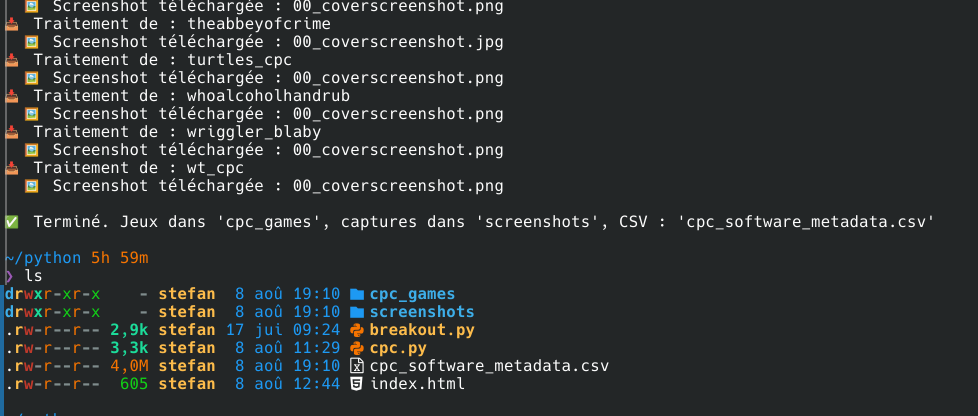
✅ Fait quoi ?

  • Récupère les métadonnées de chaque jeu de la collection softwarelibrary_cpc
  • Télécharge :
    • le ou les fichiers du jeu (.dsk, .zip, etc.)
    • la capture d’écran principale (screenshot, cover, etc.)
  • Enregistre tout dans un fichier CSV cpc_software_metadata.csv :
    • identifiant, titre, description, date, créateur, sujets, URL
    • chemins locaux des fichiers et de l’image

📁 Arborescence produite :


📂 cpc_games/ ← Fichiers .dsk, .zip…
📂 screenshots/ ← Captures d’écran (cover, title, etc.)
📄 cpc_software_metadata.csv ← CSV avec métadonnées + chemins locaux

durée du telechargement : 6H

cpc.py

import os
import csv
from internetarchive import search_items, get_item

collection = "softwarelibrary_cpc"
download_dir = "cpc_games"
screenshot_dir = "screenshots"
output_csv = "cpc_software_metadata.csv"

os.makedirs(download_dir, exist_ok=True)
os.makedirs(screenshot_dir, exist_ok=True)

fields = [
    "identifier", "title", "description", "date", "creator",
    "subject", "url", "local_files", "screenshot_file"
]

allowed_extensions = ['.dsk', '.zip', '.tap', '.tzx', '.img', '.bin']
image_extensions = ['.png', '.jpg', '.jpeg']

with open(output_csv, mode="w", newline="", encoding="utf-8") as csvfile:
    writer = csv.DictWriter(csvfile, fieldnames=fields)
    writer.writeheader()

    results = search_items(f'collection:{collection}')
    for result in results:
        identifier = result.get("identifier", "")
        print(f"📥 Traitement de : {identifier}")
        item = get_item(identifier)
        meta = item.metadata

        item_files = item.files
        filtered_files = [
            f["name"] for f in item_files
            if any(f["name"].endswith(ext) for ext in allowed_extensions)
        ]

        downloaded_paths = []
        if filtered_files:
            try:
                # Les fichiers seront dans un sous-dossier du nom de l'identifiant
                item.download(
                    destdir=download_dir,
                    files=filtered_files,
                    verbose=False
                )
                downloaded_paths = [
                    os.path.join(download_dir, identifier, f) for f in filtered_files
                ]
            except Exception as e:
                print(f"  ❌ Erreur téléchargement fichiers : {e}")
                continue

        screenshot_path = ""
        for file in item_files:
            name = file["name"].lower()
            if any(name.endswith(ext) for ext in image_extensions) and (
                "screenshot" in name or "title" in name or "cover" in name or "thumb" in name
            ):
                try:
                    # Téléchargement de l'image dans sous-dossier du jeu
                    item.get_file(file["name"]).download(
                        destdir=os.path.join(screenshot_dir, identifier),
                        verbose=False
                    )
                    screenshot_path = os.path.join(screenshot_dir, identifier, file["name"])
                    print(f"  🖼️ Screenshot téléchargée : {file['name']}")
                    break
                except Exception as e:
                    print(f"  ⚠️ Erreur screenshot : {e}")
                    break

        writer.writerow({
            "identifier": identifier,
            "title": meta.get("title", ""),
            "description": meta.get("description", ""),
            "date": meta.get("date", ""),
            "creator": meta.get("creator", ""),
            "subject": "; ".join(meta.get("subject", [])) if isinstance(meta.get("subject"), list) else meta.get("subject", ""),
            "url": f"https://archive.org/details/{identifier}",
            "local_files": "; ".join(downloaded_paths),
            "screenshot_file": screenshot_path
        })

print(f"\n✅ Terminé. Jeux dans '{download_dir}', captures dans '{screenshot_dir}', CSV : '{output_csv}'")


Arnold

statiquedynamique

Sécurisez votre serveur SSH

1. Désactiver l’accès SSH direct au compte root ainsi que l’authentication par mot de passe

⚠️ Avant de désactiver les mots de passe, vérifier la connexion via clé SSH

Dans /etc/ssh/sshd_config, modifier :

PermitRootLogin no
PasswordAuthentication no

script de surveillance et blocage automatique des IP malveillantes

Les tentatives de brute-force SSH sont omniprésentes dès qu’un serveur Linux est exposé à Internet.

  • Surveiller les échecs de connexion SSH
  • Bloquer automatiquement les IP abusives via iptables
  • Vous alerter par e-mail en cas de bannissement

ssh-monitor.sh

Placez ce code dans /usr/local/bin/ssh-monitor.sh et rendez-le exécutable (chmod +x).

#!/usr/bin/env bash

# -------------------------------------------------------------------
# /usr/local/bin/ssh-monitor.sh
# Surveillance des échecs SSH et blocage automatique des IP trop actives
# -------------------------------------------------------------------

# Configuration
LOGFILE="/var/log/auth.log"           # Fichier de log SSH
STATEFILE="/var/tmp/ssh-monitor.state"  # Pour mémoriser la position lue
THRESHOLD=5                            # Seuil d'échecs avant blocage
ADMIN_EMAIL="admin@votredomaine.tld"   # Destinataire des alertes
BAN_CHAIN="SSH-BAN"                    # Chaîne iptables dédiée

# Création et liaison de la chaîne iptables
iptables -L $BAN_CHAIN >/dev/null || iptables -N $BAN_CHAIN
iptables -C INPUT -j $BAN_CHAIN >/dev/null || iptables -I INPUT -j $BAN_CHAIN

# Initialisation du statefile si nécessaire
: > "$STATEFILE" 2>/dev/null || echo "0" > "$STATEFILE"

# Lecture incrémentale du log
LAST_POS=$(cat "$STATEFILE")
CUR_POS=$(stat --format=%s "$LOGFILE")
[[ $CUR_POS -lt $LAST_POS ]] && LAST_POS=0

tail --bytes=+$((LAST_POS + 1)) "$LOGFILE" \
  | grep "Failed password for" \
  > /tmp/ssh-fails.$$

echo "$CUR_POS" > "$STATEFILE"

# Comptage et blocage
awk '{ for(i=1;i<=NF;i++) if ($i ~ /^[0-9]+\.[0-9]+\.[0-9]+\.[0-9]+$/) print $i }' /tmp/ssh-fails.$$ \
  | sort | uniq -c | while read count ip; do
    if (( count >= THRESHOLD )); then
      if ! iptables -C $BAN_CHAIN -s "$ip" -j DROP >/dev/null; then
        iptables -A $BAN_CHAIN -s "$ip" -j DROP
        echo -e "Subject: [ALERTE SSH] IP bannie : $ip\n\n$(date)\nL'IP $ip a généré $count échecs SSH et a été bloquée." \
          | sendmail "$ADMIN_EMAIL"
      fi
    fi
done

# Nettoyage
rm -f /tmp/ssh-fails.$$

Comment fonctionne le script ?

1. Configuration

LOGFILE : fichier de logs SSH (/var/log/auth.log sur Debian/Ubuntu).
THRESHOLD : nombre d’échecs avant blocage automatique.
ADMIN_EMAIL : destinataire des e-mails d’alerte.
BAN_CHAIN : chaîne personnalisée iptables.

2. Chaîne iptables dédiée

Le script crée une chaîne SSH-BAN puis l’insère en tête de la chaîne INPUT : ainsi tous les paquets entrants sont filtrés par SSH-BAN avant le reste de la configuration.

3. Lecture incrémentale

Pour éviter de reparcourir tout le fichier de log à chaque passage, on mémorise la dernière position lue dans STATEFILE. Si le log est tourné (rotation), on repart de zéro.

4. Extraction et comptage

Le script filtre les lignes contenant « Failed password for », extrait les adresses IPv4, puis trie et compte les occurrences.
Les IP dépassant le seuil défini sont alors ciblées.

5. Blocage et notification

Pour chaque IP abusive, on ajoute une règle DROP dans la chaîne SSH-BAN (si elle n’y figure pas déjà), puis on envoie un mail d’alerte via sendmail.

6. Nettoyage

Le fichier temporaire de collecte des échecs est supprimé à la fin de l’exécution (/tmp/ssh-fails.$PID).

Mise en place

  1. Enregistrez le script : sudo nano /usr/local/bin/ssh-monitor.sh sudo chmod +x /usr/local/bin/ssh-monitor.sh
  2. Installez un MTA (ex. sendmail, postfix, msmtp) pour les alertes e-mail.
  3. Créez une tâche cron pour exécuter le script chaque minute : sudo crontab -e Ajoutez la ligne : * * * * * /usr/local/bin/ssh-monitor.sh
  4. Vérifiez périodiquement votre chaîne de blocage : sudo iptables -L SSH-BAN -n --line-numbers

Conclusion

Ce script Bash offre une protection simple et efficace contre les attaques de brute-force SSH

Thème : Superposition par Kaira. CopyLerft 2025