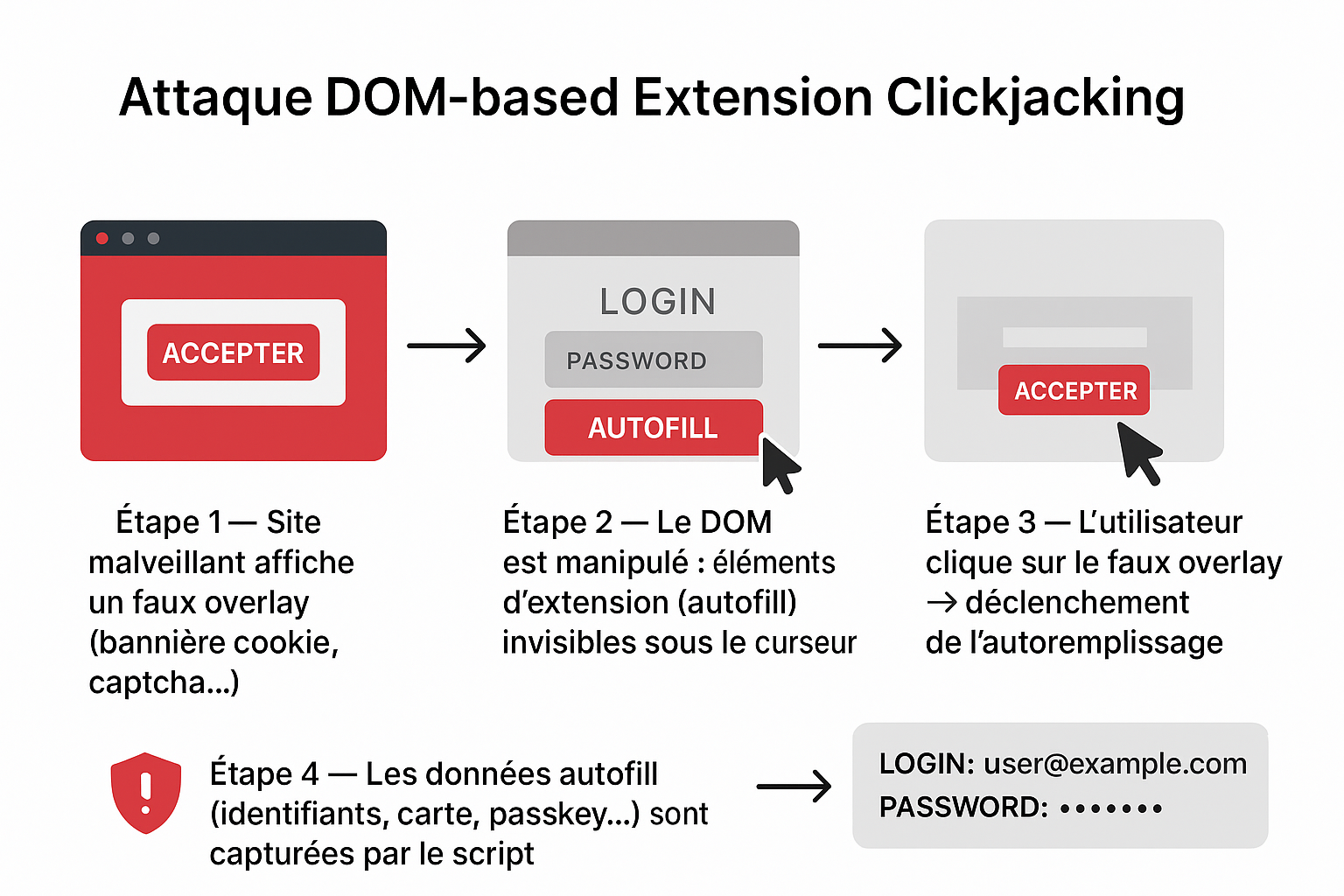
DOM-based Extension Clickjacking : Le ciblage invisible des gestionnaires de mots de passe
Contexte technique
Lors de la conférence DEF CON 33, le chercheur en sécurité Marek Tóth a dévoilé une vulnérabilité redoutable affectant les extensions de gestionnaires de mots de passe : le DOM-based Extension Clickjacking, permettant d’exfiltrer des données sensibles par un simple clic utilisateur marektoth.comThe Hacker News.
Qu’est-ce que le DOM-based Extension Clickjacking ?
Contrairement aux attaques de clickjacking classiques côté Web (iframes invisibles), cette attaque cible les éléments injectés dans le DOM par une extension (menus d’autoremplissage, pop-ups…). Le script malveillant :
- rend ces éléments invisibles via
opacity: 0, - capte un clic sur une fausse interface (ex : bannière cookie),
- et déclenche l’autoremplissage pour exfiltrer les données marektoth.comheise onlineThe Hacker News.
Résultats des tests – 11 gestionnaires analysés
| Statut de la vulnérabilité | Gestionnaires concernés |
|---|---|
| Corrigés | NordPass, ProtonPass, RoboForm, Dashlane, Keeper marektoth.comReddit |
| Toujours vulnérables (au 19–21 août 2025) | Bitwarden, 1Password, iCloud Passwords, Enpass, LastPass, LogMeOnce marektoth.comThe Hacker NewsSocket |
Impact estimé : ~40 millions d’utilisateurs actifs marektoth.comThe Cyber Express.
Données exfiltrables
- Numéros de carte bancaire (numéro, CVV…) → 6/9 cas marektoth.com
- Données personnelles (nom, email, adresse…) → 8/10 cas marektoth.com
- Identifiants, mots de passe, TOTP → 10/11 cas marektoth.com
- Passkeys (authentifications cryptographiques modernes) → exploitables via “signed assertion hijacking” → 8/11 cas marektoth.com
Pourquoi c’est critique
- L’attaque est universelle : aucun bug spécifique requis, un simple clic suffit The Cyber Express.
- Les protections classiques côté Web ne suffisent pas.
- Même des extensions configurées en mode manuel (pas d’autoremplissage automatique) restent vulnérables marektoth.com.
- Les passkeys, initialement considérées comme plus sécurisées, peuvent aussi être compromises si les défis côté serveur ne sont pas correctement mis en œuvre marektoth.comThe Cyber Express.
Contre-mesures à court terme
- Active les mises à jour automatiques de ton navigateur et de ton extension heise onlineThe Hacker News.
- Désactive l’autoremplissage ; privilégie le copier-coller.
- Pour les navigateurs Chromium, configure l’extension en mode « On click » (accès sur clic uniquement) marektoth.comheise online.
- Côté serveur : assure-toi que chaque connexion via passkey inclut un challenge session-bound dynamique, pour éviter le réemploi abusif marektoth.com.
Autofill feature
Password managers have autofill functionality that can be of 2 types:
- Automatic autofill – credentials are automatically filled in (0-click)
- Manual autofill – user interaction is required to fill in credentials (selecting from a dropdown menu)


My research focuses on clickjacking, so click is required and I was focus only on manual autofill.
On automatic autofill I published research in 2021 (blog).
Browser Extension Clickjacking
Clickjacking vulnerability in browser extensions works similarly to web applications. Through clicking, the user unknowingly performs an action that causes their browser extension to execute malicious activity such as data exfiltration, functionality deactivation, stored note deletion and others.
Browser extension clickjacking can currently be categorized into 2 types:
- IFRAME-based – publicly described type (web_accessible_resources)
- DOM-based – new described type
I will first describe the IFRAME-based variant, which was not the research focus but may be unknown to many people.
IFRAME-based
A publicly documented clickjacking technique for browser extensions exploits misconfigured web_accessible_resources in the manifest.json file.
manifest.json is the main configuration file of a browser extension. It contains basic information such as the extension’s name, version, and description, as well as settings that define what scripts, icons, and permissions the extension uses. Without this file, the browser cannot recognize or run the extension.
Chromium-based path:
chrome-extension://<extension_ID>/manifest.jsonMozilla Firefox path:
moz-extension://<extension_ID>/manifest.jsonLocal device path:
%LocalAppData%\Google\Chrome\User Data\Default\Extensions\<extension_ID>\<version>\manifest.json
In the web_accessible_resources part, developers explicitly define files (HTML, scripts, styles, images) that should be accessible from web pages outside the extension interface itself. If developers don’t specify sufficient restrictions, attackers can abuse these resources.
Usage
When files with significant functionality (HTML files) are defined in web_accessible_resources, an attacker can create a page that loads this file into a transparent iframe and tricks users into unknowingly clicking on extension elements.
This uses basically the same principle as web application clickjacking.
Basic usage:
<iframe src="chrome-extension://<extension_ID>/file.html" style="opacity:0"></iframe>
Example
Although this isn’t a new technique and information has been available for several years, some extensions still have this security vulnerability. In this research focused on password managers, one of them had this issue.
In December 2023, I reported this clickjacking vulnerability in the NordPass password manager. Due to incorrect web_accessible_resources definition, it was possible to load the entire password manager UI in an iframe.


With 4 clicks, it was possible to share all items from the password manager to an attacker’s account. The result was that the attacker gained access to all stored passwords, credit cards, and personal data without the user’s knowledge.